
샤플 이용료 80% 지원 받기
🤔 Your store teams are submitting requests through a posting board — but as posts pile up, it becomes nearly impossible to tell what's been handled, what's still in progress, and what hasn't been looked at yet.
You've forwarded requests to the right people, but checking whether anything is actually moving means opening every single post one by one. And when nothing is tracked, things fall through the cracks.
Is there a way to manage store issues and requests by stage — and quickly spot what still needs attention?
🙆 Use Shopl's custom status labels on your Posting board to see exactly where every request stands — without opening a single post.
Set up status labels that match how your team actually works, and attach them to each post to show its current stage.
From submission to resolution, every request stays visible and accountable — so nothing gets missed.
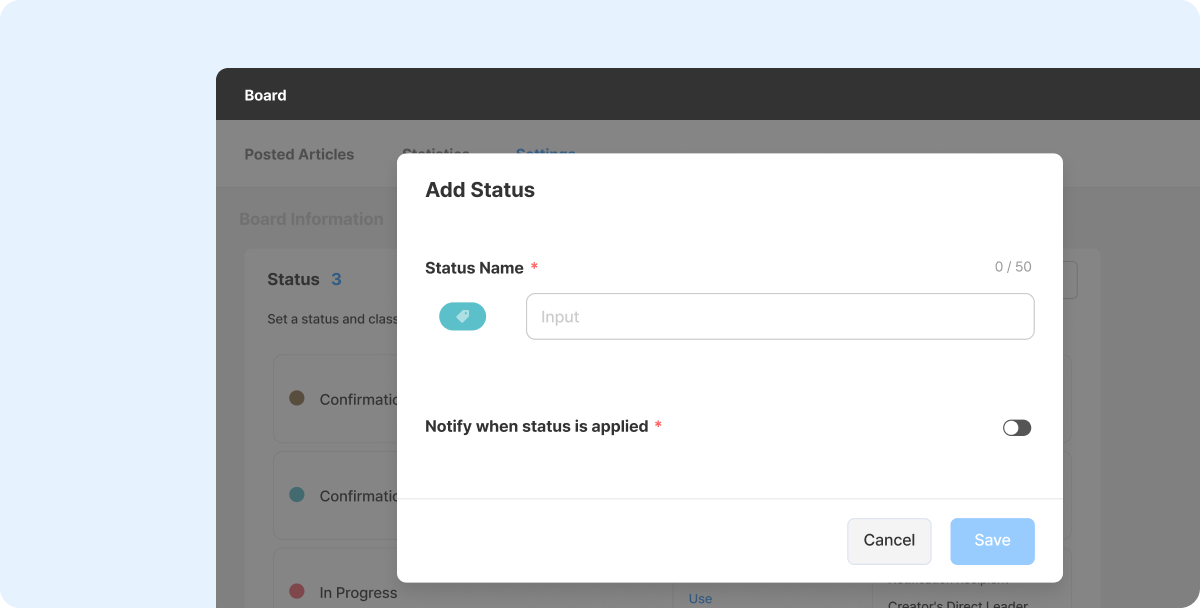
Different boards handle different types of requests — and each one has its own natural flow. Shopl lets you define status labels that reflect how work actually moves in your operation.
For a facility fault board, that might look like: *Received → Under Review → Repair in Progress → Completed*. For a store improvement board: *Needs Review → Ongoing → Reflected → On Hold*. You decide the stages; the labels follow your process.
This also means handover between team members becomes much cleaner. Anyone picking up a request can immediately see where it left off — no need to chase colleagues or re-read entire threads.
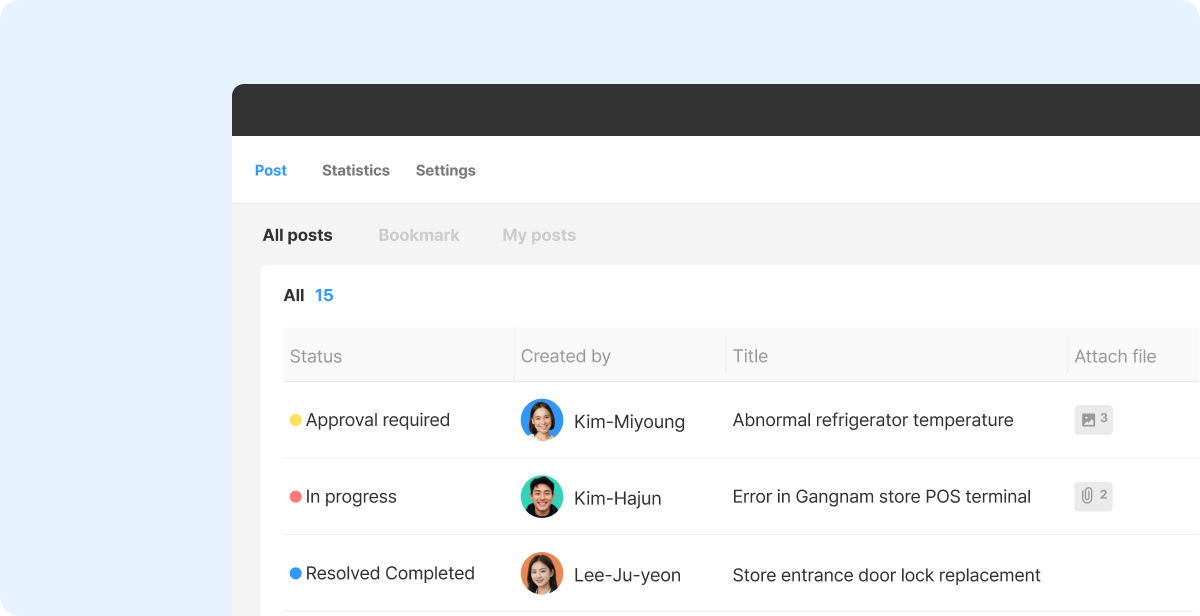
Every post in the List of posts displays its current status label, so you can scan the board and know exactly where things stand — no clicking required.
If you're managing facility fault reports from multiple stores, you can see at a glance which ones are still being handled, which need a follow-up, and which are completed.
When a representative updates a status, it's reflected right away. That means HQ managers always have an accurate, live view of what's ongoing and what's done — without waiting for someone to send an update.
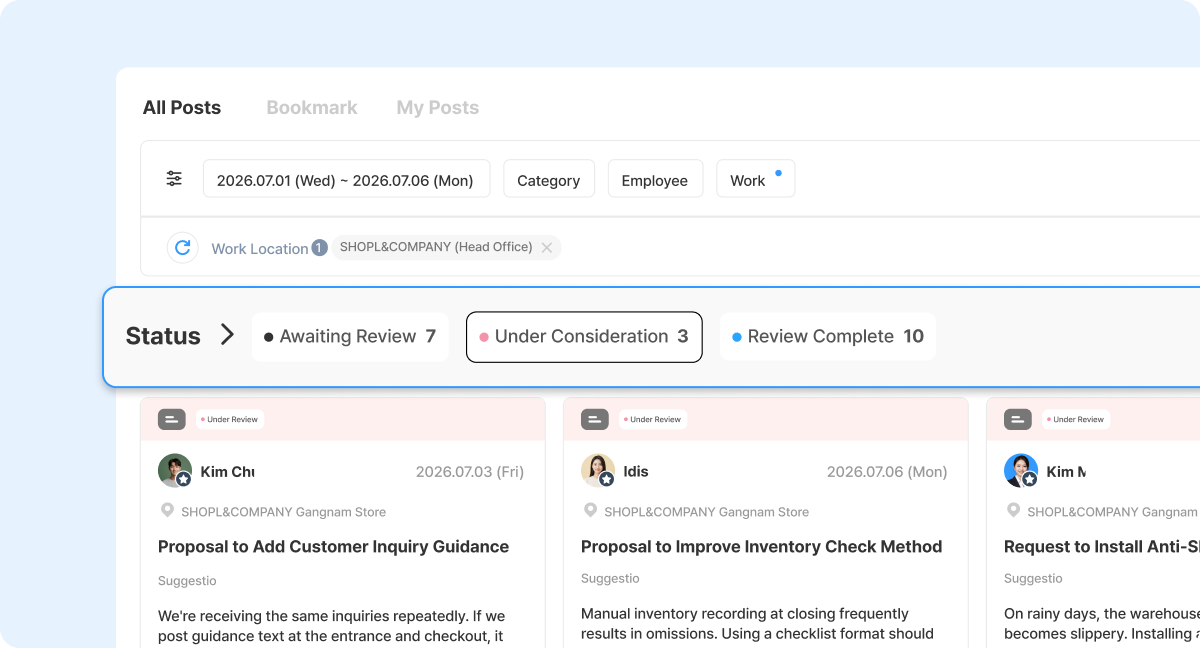
As the volume of posts grows, what matters most is being able to zero in on what still needs attention.
Shopl's Filtering by status lets you pull up only the posts that require action — for example, everything still marked "Under Review" or "Needs Follow-up" — so nothing stays unresolved by accident.
If you're overseeing improvement requests across multiple stores, you can isolate unreviewed submissions and send them directly to the right representative. Or filter to separate completed requests from incomplete ones for a periodic review.
This removes the need to chase updates across WhatsApp, email, or other channels. Every request lives in one place, with a clear status — so you always know what's been done and what hasn't.
A. Yes. From the status label settings in your Posting board, you can reorder labels and edit their names any time to reflect changes in your workflow or process.
Keep in mind: if you rename a label that's already been applied to existing posts, the new name will be reflected across all of those posts automatically. Before making changes during active operations, it's a good idea to let your team know so no one is caught off guard.
A. Yes. You can set up notifications to be sent whenever a status label is applied or changed on a post.
You control which status changes trigger notifications and which don't — and you can turn them on or off at any time.
You can also choose how notifications are delivered: via push notification or email. You can even specify which recipients receive alerts for each status change, so the right person is always informed and ready to take the next step.
Store requests, facility issues, and improvement submissions don't end when they're submitted — they end when they're resolved. The hard part is making sure nothing gets lost in between.
With Shopl's custom status labels on your Posting board, every request has a visible stage, every update is tracked in real time, and nothing slips through because "someone was supposed to handle it."
Start managing your store requests end-to-end — with full visibility at every step.













