
샤플 이용료 80% 지원 받기

🤔 In most stores, you're managing a mix of store managers, supervisors, and part-time staff — all with different responsibilities and different information needs.
Yet when a hygiene standard update or a promotion rollout lands, the default move is still one notice to everyone. The result? Managers scroll past instructions meant for frontline staff. Employees get confused by management-level directives that don't apply to them. And the critical guidance that actually needed to reach the right person? Lost in the noise.
👉 With Shopl's Notice & Survey feature, you can target notices by role and store — and track exactly who's read them.
Send the right message to the right people, and stop chasing down missed communications.
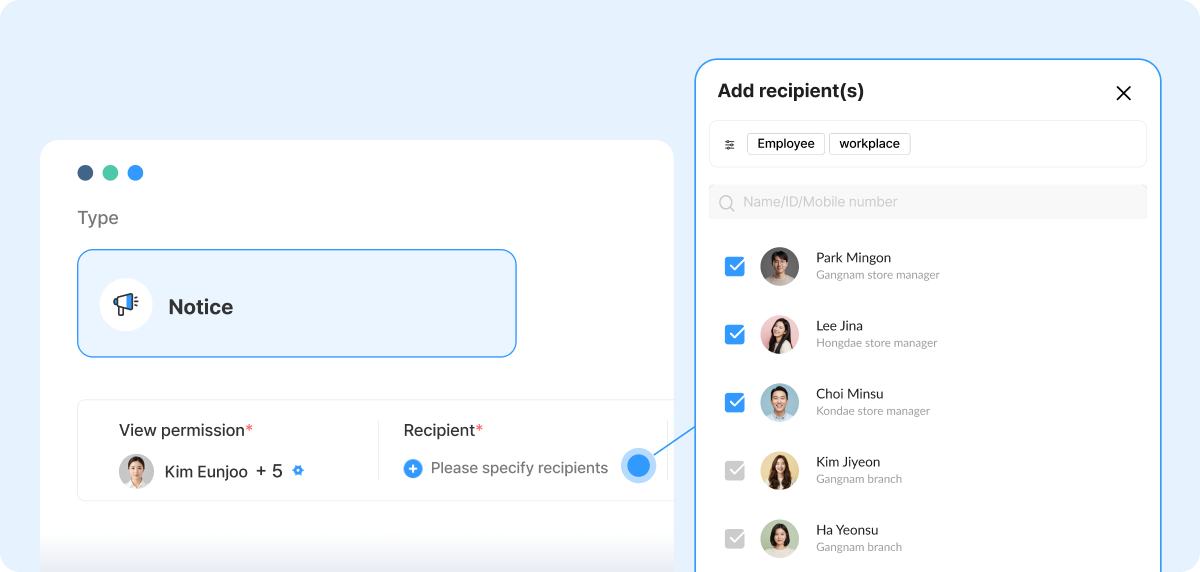
When you send one notice to all employees, relevant and irrelevant information reaches everyone at once. Managers wade through staff-level details. Frontline employees get instructions that don't apply to their role.
In Shopl, you can specify exactly who receives each notice — by role, by store, or both. That means when a new hygiene standard rolls out, you can send two targeted notices instead of one catch-all:
Each person sees only what they need to act on. Nothing more, nothing less.
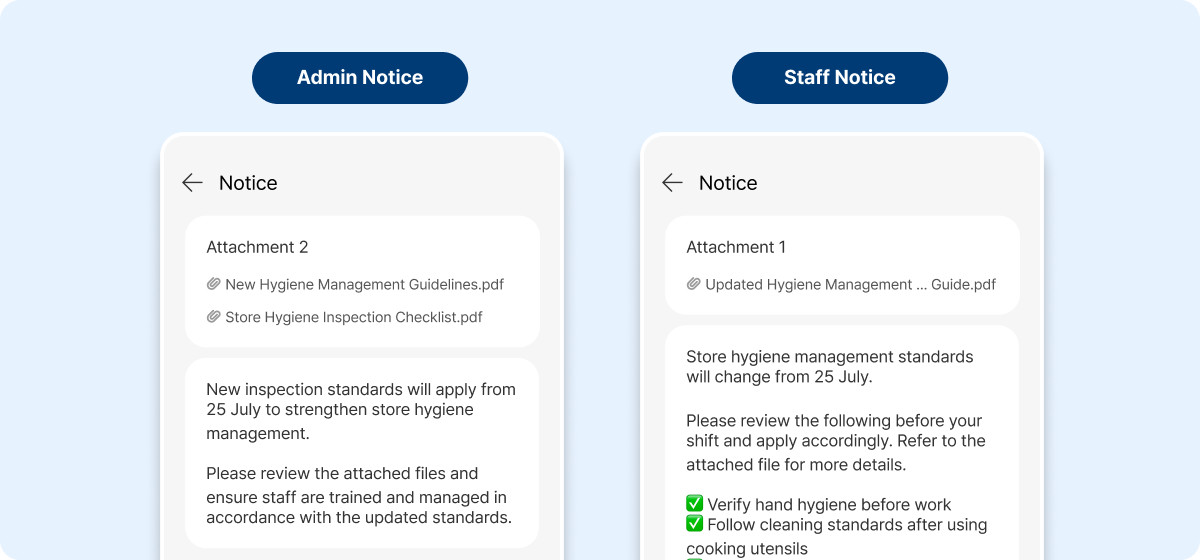
The same policy can require completely different actions depending on who's reading it. When everyone gets the same wording, people either ignore what doesn't apply to them — or worse, misread what does.
For a promotional event, for example:
When you write each notice for its audience, staff don't have to decode which parts apply to them. "What do I need to do?" becomes obvious — and the follow-up questions stop.
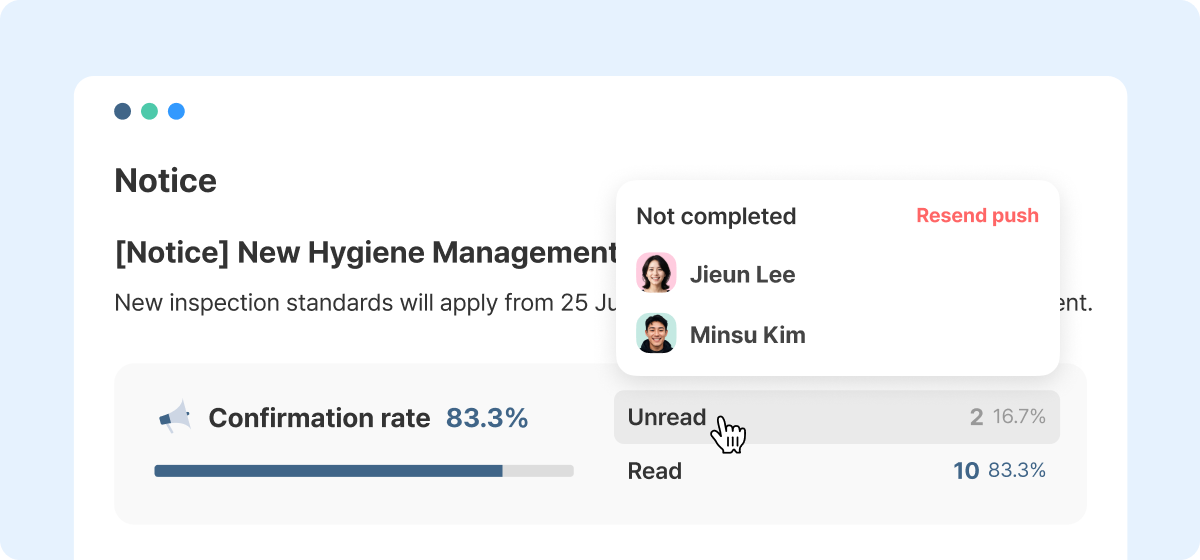
After sending a notice, the usual next step is a round of manual check-ins: messaging individuals through WhatsApp, asking in group chats, or following up at the start of a shift. It's time-consuming — and easy to miss someone.
In Shopl, you can see the read status for every notice at a glance. You know exactly who's read it and who hasn't — so you can follow up only with the people who need it. For operational directives sent specifically to managers and supervisors, this is especially useful: confirm that the people accountable for execution have actually seen their instructions, before a gap becomes a problem.
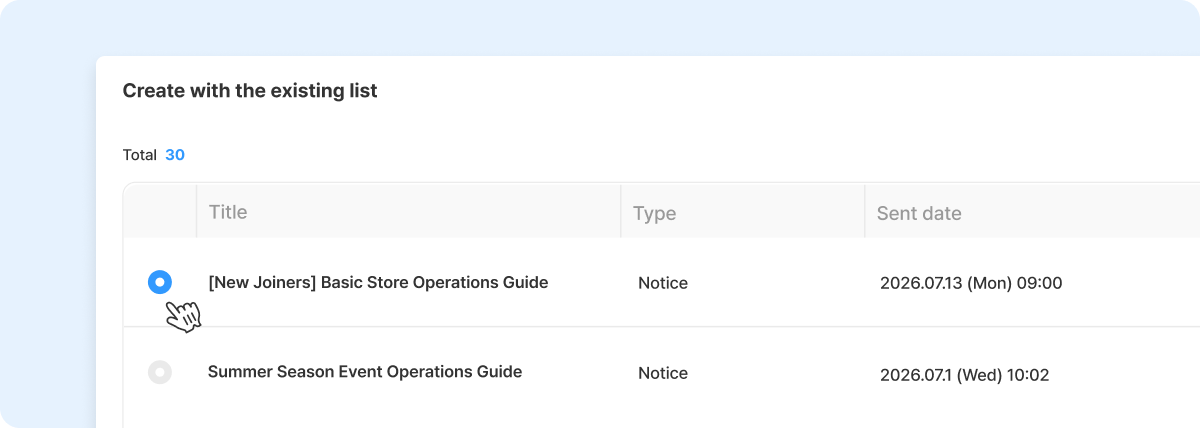
Onboarding reminders for newly hired staff, hygiene inspection guidelines, promotion runbooks — these notices come around again and again. Rewriting them from scratch each time isn't just tedious; it introduces inconsistency.
In Shopl, every notice and survey you've sent is saved to your dashboard. Pull up a previous notice, make the edits you need, and send — in a fraction of the time. Consistent messaging, less admin work, and no more wondering whether this version matches the last one.
A. Yes, absolutely.
When creating a notice, you can combine store and role filters to reach exactly the right people. For example, you can target only the store managers at Store A, or only part-time staff at Store B — without sending a general notice to your entire organization. If an update only applies to one location or one role, it only goes to them.
Managing a team of mixed roles doesn't have to mean sending mixed messages. With Shopl's Notice & Survey feature, you can deliver the right notice to the right people, confirm who's actually read it, and follow up where it counts — without the manual back-and-forth.
If you've been squeezing manager directives and staff instructions into a single notice and dealing with the confusion that follows, it's time to send smarter.













