샤플 이용료 80% 지원 받기

A simple Excel attendance sheet to record session-by-session presence, auto-calculate total attendance counts, and display individual attendance rates as percentages


A practical attendance sheet should include enough information for managers to review attendance clearly.
Key fields usually include:
For teams managing multiple locations, including location information is especially important. It helps managers compare attendance records and understand workforce availability across different sites.
When managers use different formats, collecting and comparing attendance information becomes difficult. If you're running multiple locations, it's worth setting a standard format so all employees record attendance in a consistent way.
Tracking attendance alone isn't enough—it's important to compare scheduled shifts with actual clock-in and clock-out times. Identifying late arrivals and gaps between planned and actual hours helps you spot workforce issues early and ensures employees are paid accurately.
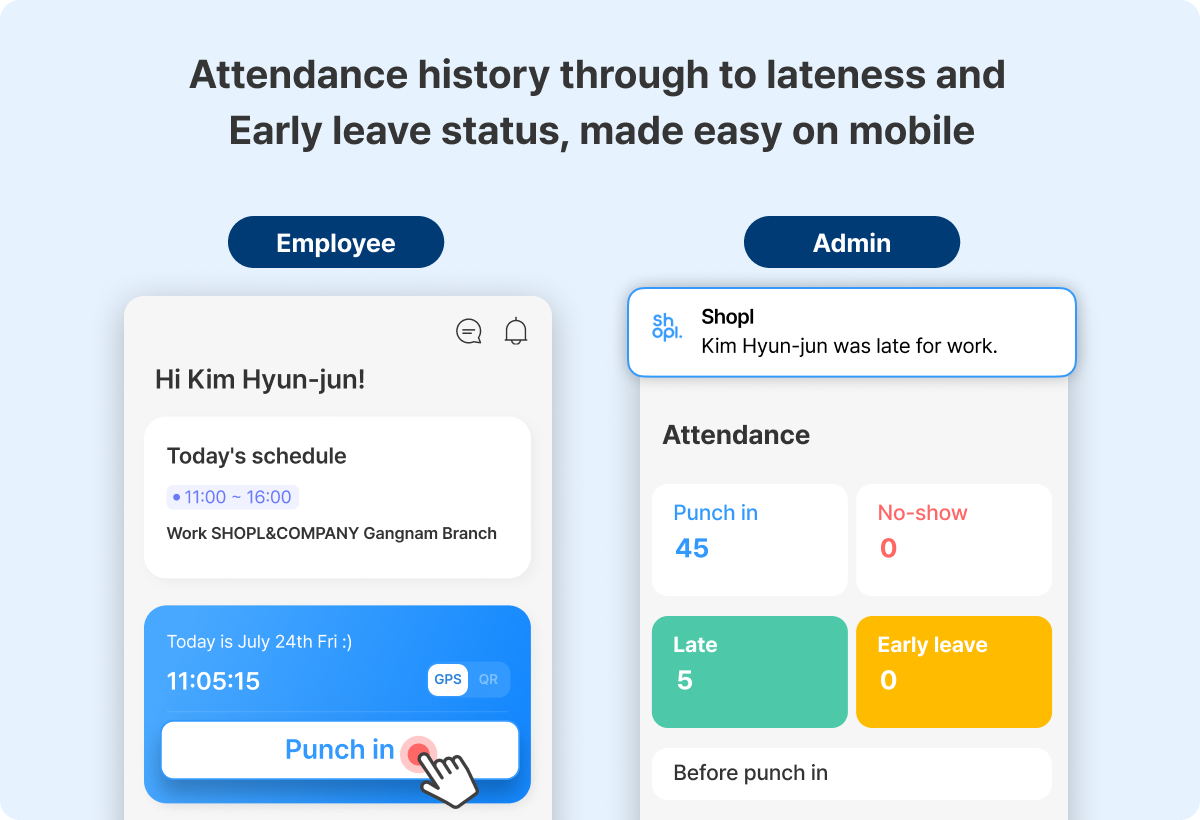
Managing attendance doesn't have to be complicated.
With Shopl's [Attendance] feature, employees can clock in and out from their mobile devices, while the system automatically logs accurate data using location verification and identity authentication. Managers can monitor clock-in and clock-out records in real time from the dashboard—no manual entry required.
Shopl's [Schedule] feature brings shift schedules and attendance records together in a single calendar view. You can see clock-in and clock-out times alongside exceptions such as late arrivals and time adjustments, so there's no need to switch back and forth between separate pages.
If you want a simpler, more accurate way to manage attendance alongside your actual shift schedules, give Shopl a try!