샤플 이용료 80% 지원 받기

Every time you open a store's EXCEL file, the first question is: "Is this the latest version?" When a report doesn't come in, you're left wondering whether to hunt for the file or chase down the person responsible. And every time a new hire joins, the conversation starts with "Where's that file?"
If these situations sound familiar, you're not alone. Many store managers, SVs, and head office teams are quietly questioning whether spreadsheet-based management is still working for them — even if switching feels like more trouble than it's worth.
Moving away from EXCEL isn't just swapping one tool for another. It means rethinking how information flows between stores and head office — who sees what, when, and how. This article breaks down the real operational pain points that come with spreadsheet management, and how to think about making the switch.
Spreadsheets are still everywhere, and for many teams, they feel like they're doing the job. But that familiarity is exactly what makes problems hard to see — and harder to act on.
A 2025 industry survey found that 65.8% of companies had not yet started moving away from spreadsheet-based operations. Among the reasons cited: over-reliance on specific individuals who "own" the files, and a lack of visibility into what's actually happening across the business — what you might call a black-box problem.
When only one person knows how to Update a file, when no one can tell which version is current, or when a colleague accidentally overwrites critical data — these issues stay hidden in small operations. But as the number of stores grows, the cracks start to show.
Managing multiple locations means trying to consolidate information from stores that each track things in their own way. Head office collects files, opens each one, and tries to piece together a complete picture. That process brings three persistent problems: information delays, data entry errors, and the mounting time it takes to aggregate everything.
When multiple people across multiple locations need to Update and Share the same information on an ongoing basis, a spreadsheet-only approach creates more coordination overhead than it solves.
A 2025 survey of small and mid-sized businesses found that 26.1% flagged calculation errors, data entry mistakes, and missed entries as their top challenge in managing attendance and workforce records. Each error may seem minor on its own — but tracking down and fixing them adds up fast, especially when multiple stores and team members are involved.
Opening checklists, daily sales reports, Inventory checks — when these are tracked in spreadsheets, the Data ends up scattered: on someone's laptop, in a shared folder, or buried in an email Attachment. Head office has to open each file individually to get any kind of picture of what's happening across stores. Just figuring out which stores have submitted and which haven't can take significant time — and when that becomes a daily routine, missed checks and delayed follow-ups are almost inevitable.
When one person builds and maintains the spreadsheet logic — macros, formulas, custom formatting — and none of it is documented, their departure leaves the team with a system no one fully understands. The same risk applies whenever file structures or entry conventions exist only in one person's head.
Any operation that can only run when a specific person is present is a direct threat to consistency and stability across your stores.
Store staff update something on their end — an issue resolved, a task Completed — but that change never makes it into the head office spreadsheet. When decisions get made based on outdated information, the result is conflicting instructions, duplicated effort, and a back-and-forth between stores and head office that wastes everyone's time.
▪︎ Store staff: less time on admin, more time on the floor
For staff, the burden isn't just entering data — it's also figuring out where to record what, then making sure it gets shared and confirmed with the right people. When Tasks are assigned directly in the tool and completions are logged in the same place, things stop falling through the cracks, and the back-and-forth needed to verify status is dramatically reduced.
▪︎ Store managers and SVs: a clear picture of every store without the legwork
When each store runs its own separate files, SVs covering multiple locations spend a lot of time just getting up to speed before each visit. When progress, checklist Status, and Incomplete Tasks are visible in one place, SVs can walk into any store already knowing where to focus — and prioritize their visits accordingly.
▪︎ Head office: a consistent, repeatable operating standard across all stores
When every store records and reports using the same format within the same system, head office gets Data they can actually trust and act on. When a New Store opens, the same setup applies from day one — no dependency on institutional knowledge, no ramp-up period, just the same standard running everywhere.
Start by listing every workflow that currently runs on spreadsheets — attendance tracking, shift scheduling, inspection logs, daily sales reports, Task assignments. For each one, note how often it happens, how many people are involved, and where the friction is. That inventory becomes your roadmap.
Trying to replace everything at once is a reliable way to create confusion on the floor. Instead, prioritize workflows that are high-frequency, involve multiple people, and rely on up-to-date information. Getting those right first builds confidence in the new system — and makes the rest of the transition easier to manage.
A tool that's hard to use won't get used — especially on a busy store floor. Look for something that works smoothly on a smartphone, doesn't require heavy configuration from the Admin side, and covers the core functions of store operations — attendance, scheduling, Tasks, and reporting — within a single platform. That combination makes adoption faster and keeps things running reliably after go-live.
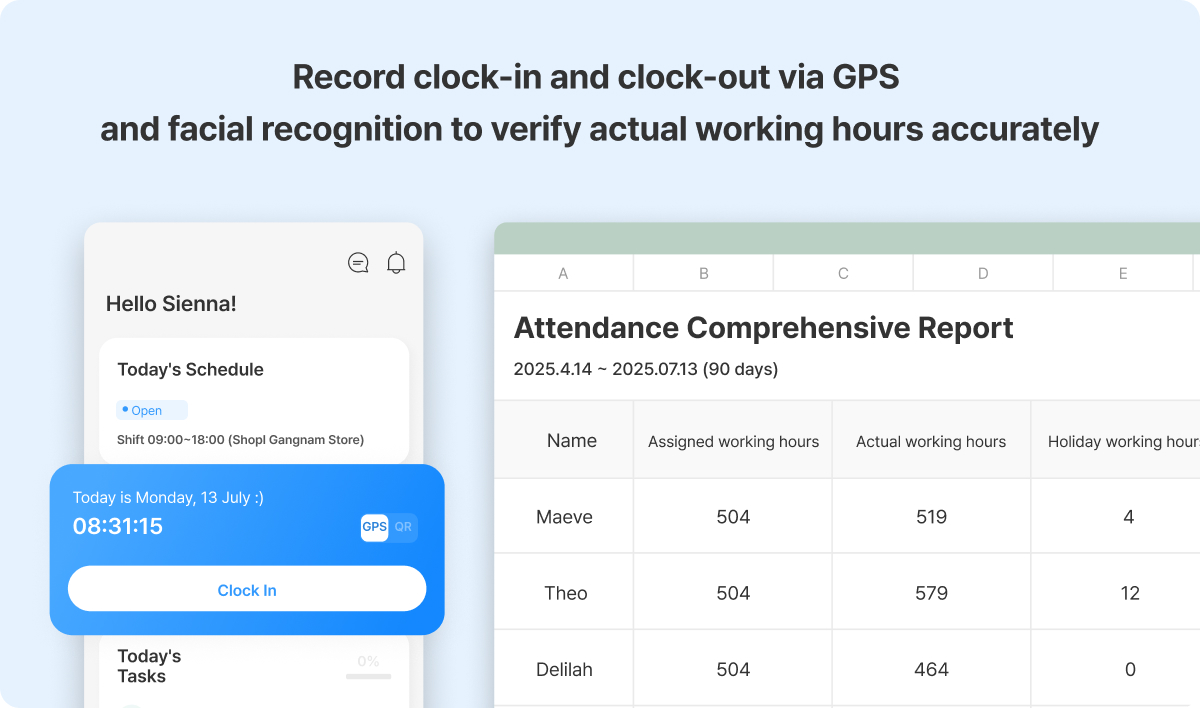
When each Store tracks Attendance records in its own EXCEL file, head office has to open and reconcile multiple files just to get a basic picture of who worked where. With Shopl's attendance feature, staff clock in and out through the app, and managers see Attendance records across all stores in one place — no file-chasing required. GPS and QR verification confirm that check-ins happen at the actual Work location, and accumulated attendance Data can be Downloaded in the format you need, eliminating the need to consolidate per-store Files manually.
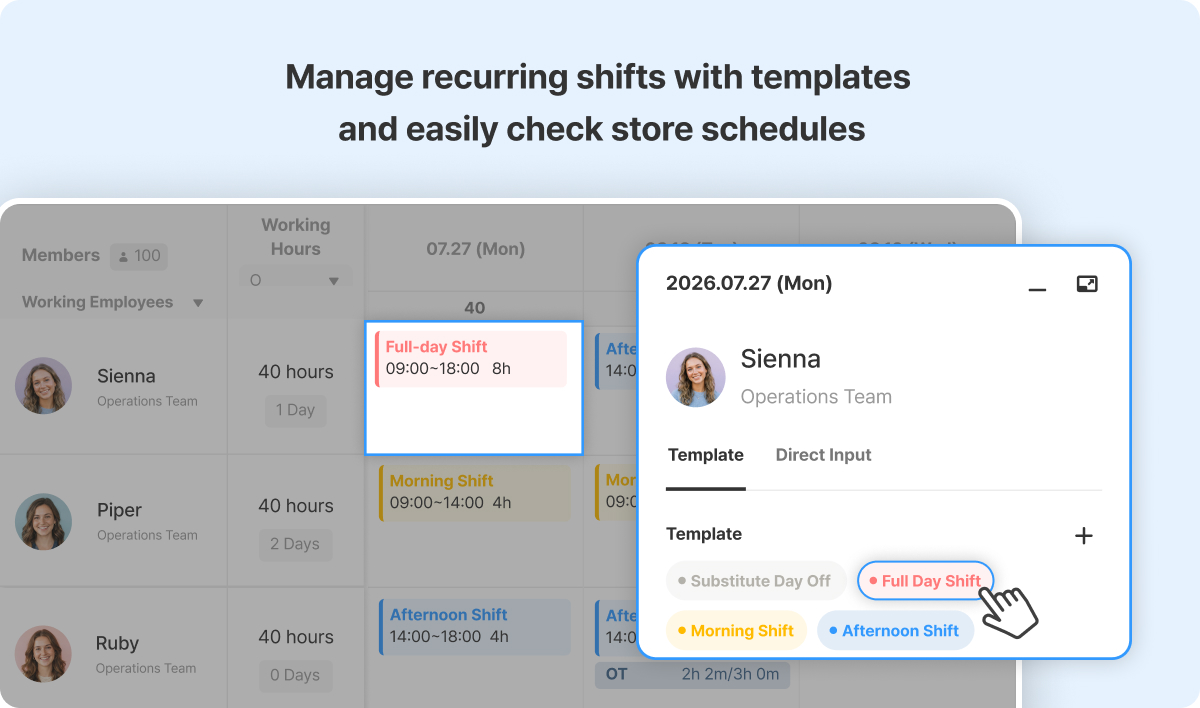
Building and sharing EXCEL shift tables store by store means every Change — a staffing swap, an updated shift Time — requires editing and resending the file. With Shopl's Schedule feature, Work schedules across all stores are managed centrally, and recurring shift patterns can be saved as Templates for easy reuse. Changes are visible immediately, without anyone needing to resend a file or confirm receipt over WhatsApp.
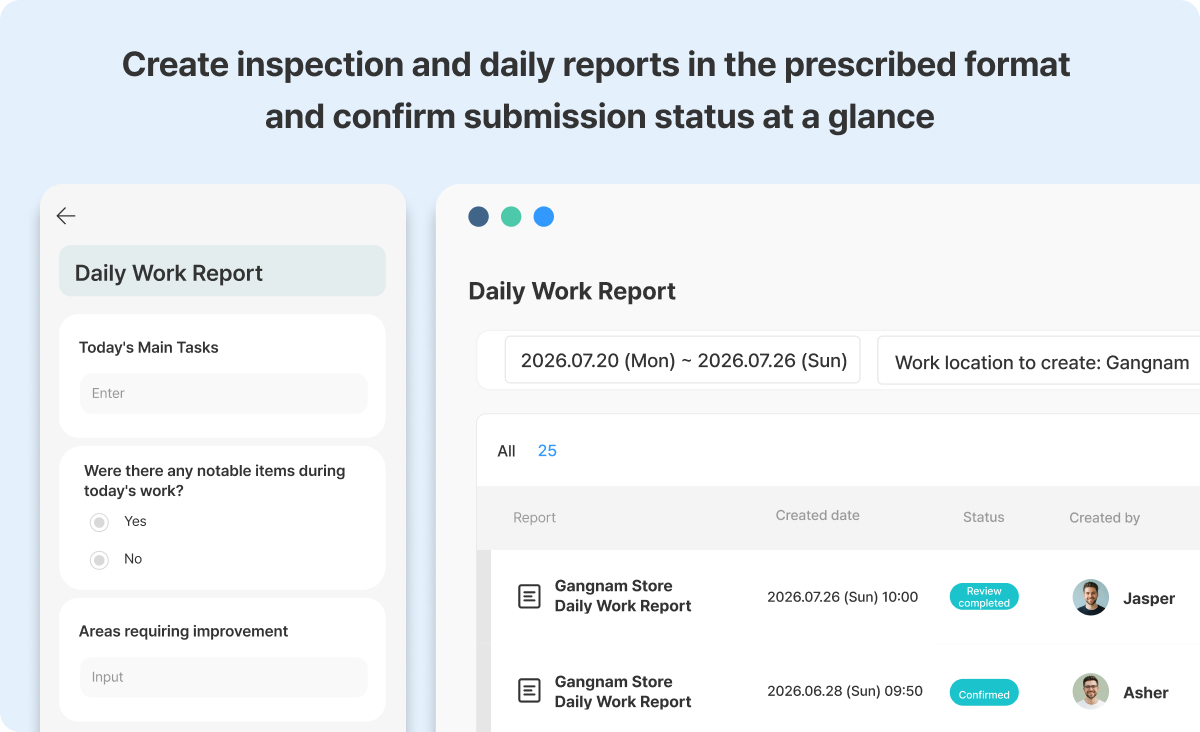
When opening checklists and daily reports are submitted as EXCEL files — or sent through WhatsApp in whatever format each store prefers — head office ends up managing inconsistent layouts and manually tracking who has and hasn't submitted. With Shopl's report feature, required fields are configured once and applied consistently across all stores. Staff complete and submit directly from the floor, and all submissions are consolidated in one place for review — no more opening individual Files to check what came in.
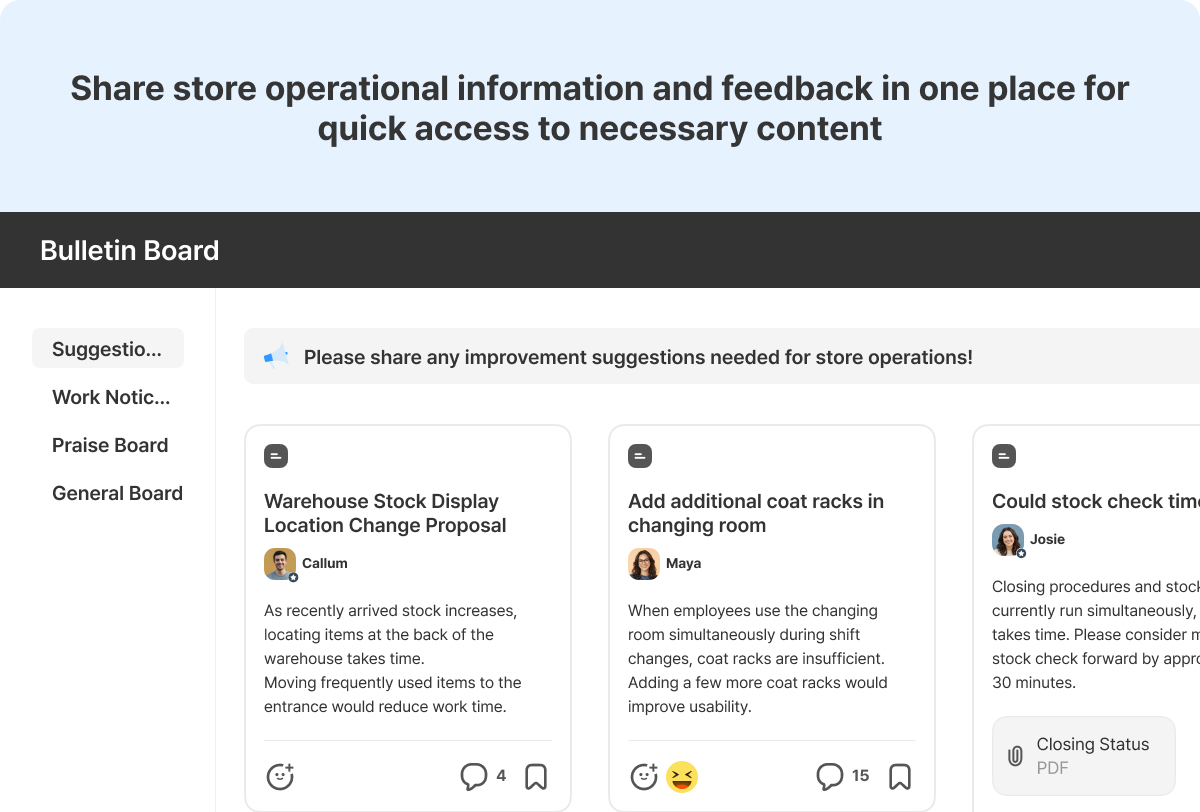
When operational guidelines, store Notices, and process updates live in a mix of EXCEL Files, WhatsApp threads, and individual inboxes, finding the right information at the right time becomes genuinely difficult. With Shopl's Posting board, Posts are organized by Topic and shared with the relevant Members — so institutional knowledge stays accessible, not buried in someone's chat history. Information that used to be distributed store by store can now be managed in one place, reducing dependency on personal file storage or messaging apps.
A. There's always a short adjustment period when any new tool is introduced. But choosing a tool that simplifies everyday data entry and status checking means that once staff are comfortable, the overall workload goes down — not up. The key factor for adoption is whether it works intuitively on a smartphone — that's what determines whether it sticks on the floor.
A. Not at all. EXCEL remains genuinely useful for ad hoc Analysis, financial modeling, and one-off data work — keep using it for that. What matters is separating the day-to-day core of store operations — field records, daily reports, Task tracking — from EXCEL dependency. That's where the operational risk lives, and that's where the switch makes the biggest difference.
A. General-purpose platforms — project management tools, Chat apps, document sharing — can technically cover a lot of ground, but they aren't built around how retail store operations actually work. Getting them to handle shift scheduling, attendance, and field reporting typically requires custom configuration that someone has to maintain. Tools built specifically for store operations have those workflows built in from the start — which means faster setup, less Admin overhead, and a much lower barrier to getting the whole team on board.
Moving beyond EXCEL in store operations isn't about replacing one tool with another. It's about making sure that attendance, scheduling, store reporting, and operational communications — all the things that currently live in separate Files across different stores and team members — can be managed consistently by anyone, using the same process every time.
Shopl brings the core functions of store operations together in one platform, replacing the scattered mix of EXCEL Files, individual folders, and WhatsApp threads with a single source of truth that both store teams and head office can work from. Whether you're managing two locations or twenty, everyone operates from the same information.
If you've been thinking "I don't need to overhaul everything at once — I just want to start getting a few key workflows off spreadsheets" or "I need a clearer picture of what's happening across all my stores," take a closer look at what Shopl can do for your operation.