
샤플 이용료 80% 지원 받기

🤔 After a safety training session, your team fills out a paper checklist, someone separately takes photos and emails them over, and attendees sign a sheet that gets filed away in a folder. By the time the training is done, the actual work of pulling everything together is just getting started — and it's eating up hours your team doesn't have.
On top of that, different sites record things differently. One location attaches photos; another just collects signatures. When it's time for an internal audit or compliance review, piecing together a consistent training history across sites becomes a real problem.
🙆 Shopl's Report feature fixes this at the source.
Build a single Report that captures training Checklists, photos, signatures, and measurements — all in one submission. The moment it's submitted, Results are shared with the Admin instantly.
Filter and search past submissions by Date or location, and every training record is right where you need it when audits come around.

When the person running safety training changes, the way records are kept tends to change too. Different formats, missing fields, inconsistent notes — it makes historical comparison nearly impossible.
With Shopl, you build the Report template once: Checklist Items, confirmation fields, open-ended memo sections, whatever your training requires. Every trainer uses the same structure, no matter which site they're at or when they joined the team. You can also restrict where Reports can be submitted, so records can only be created on-site at the actual training location — adding a layer of accountability to every entry.
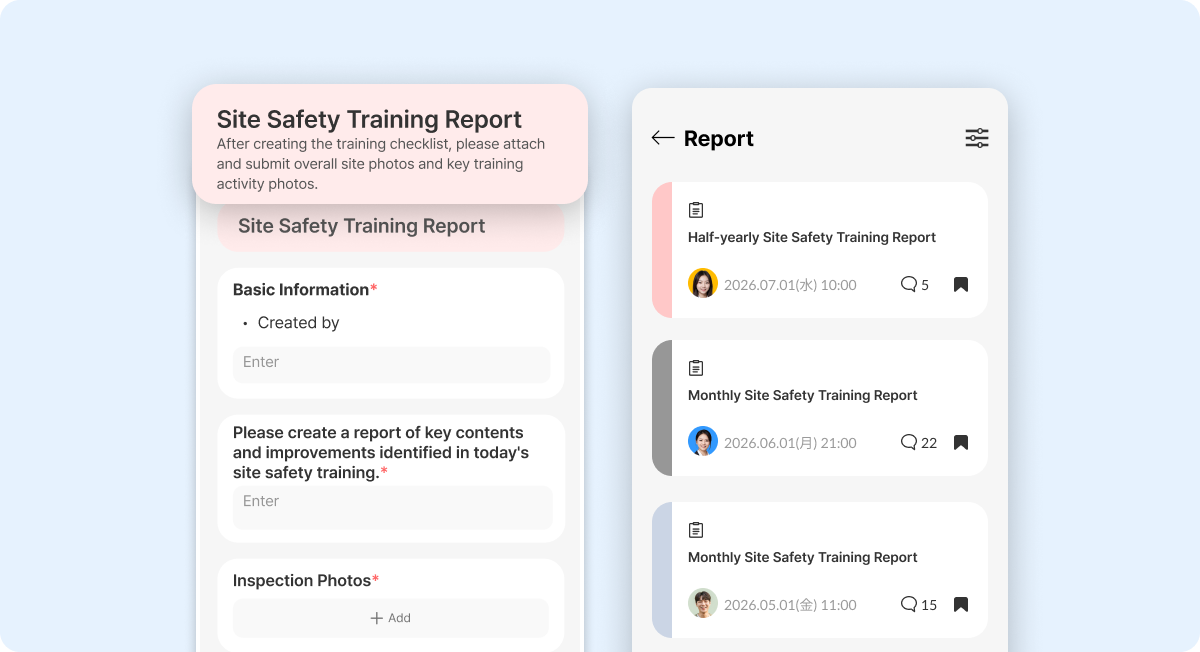
If your current process means emailing photos after training, collecting signatures on paper, and logging measurements separately in a spreadsheet, you're splitting one task across three different steps — and creating gaps every time something gets missed.
In Shopl, you can include photo submission, handwritten signature capture, and numeric input fields all within the same Report template. Trainers submit everything from the app in one go. Training Results and all supporting Proof are stored together in a single Report, so when an inspection or audit comes up, you're not scrambling to find documents across different systems.

As soon as a Report is submitted, the designated Admin receives a push notification. You can see right away whether training has been completed — and spot any sites that haven't reported in yet. If follow-up is needed, you can act immediately. No more chasing people down on WhatsApp to find out whether training actually happened.
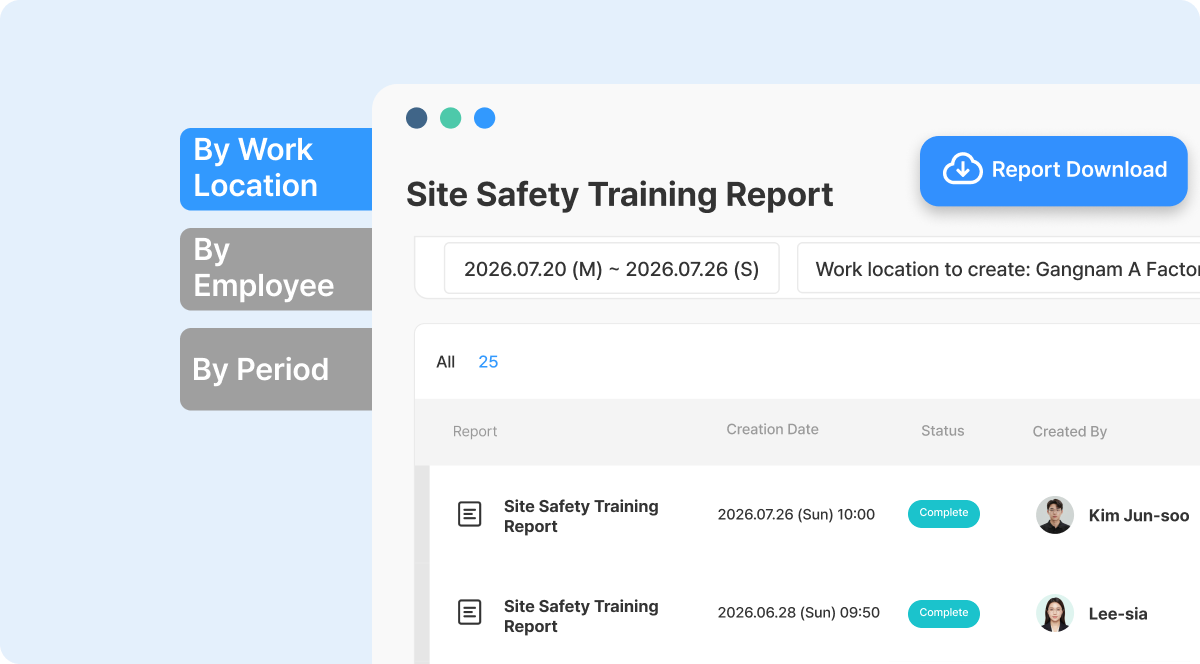
Stop wasting time hunting down past training records.
Every submitted Report is automatically organized by Date and location in Shopl. If you're overseeing multiple facilities, you can compare training Results across sites from one place without digging through folders or inboxes. And when you need to prepare for a safety inspection, certification audit, or internal review, you can download the full submission history as an Excel file — ready to share without any extra formatting work.
A. Yes, absolutely.
The Report template set up by the Admin stays in place regardless of personnel changes. Whoever takes over training simply uses the same template, so your records stay consistent from day one.
A. Yes.
You can configure a Repeat Send schedule so that trainers receive an automatic reminder when it's time to submit their training Report. Admins don't need to manually send out reminders before each session — the system handles it, and your regular training cycle keeps running on schedule.
Safety training happens on a schedule — your documentation process should too. With Shopl's Report feature, every session is captured in a consistent format, photos and signatures are stored alongside Results, and your full training history is searchable and export-ready whenever you need it. Set it up once, and let the process run itself.













