
샤플 이용료 80% 지원 받기

🤔 Promoters and merchandisers cover multiple stores — and without a clear system, it's nearly impossible to know who did what, where, and when.
Every brand has its own reporting format. Every rep sends updates through WhatsApp or a phone call. There's no consistency, photos are often missing, and when something goes wrong on the floor, tracing it back is a headache. Sound familiar?
👉 Use Shopl's report feature to track promoter field activity — organized by brand and store, all in one place.
Set up a custom report form for each brand, require promoters to submit photos and activity details straight from the field, and review everything from a single dashboard. From on-site proof to activity history, managing your promoter network just got a lot simpler.

When each brand runs different products and promotions, a one-size-fits-all report form just doesn't work — key information gets left out, and data from different brands ends up mixed together.
With Shopl, you can create a separate report form for each brand and assign only the relevant members as submitters. Each promoter sees only the form that applies to them, so reports stay organized by brand — no cross-contamination, no manual sorting, and much cleaner data when it's time to review or analyze.

Verifying that a promoter was actually on-site often means a follow-up call or checking photo timestamps — extra steps that slow everything down.
Shopl lets you restrict report submission to specific locations. Set a designated store for each report form, and only submissions from within that area will go through. No separate verification needed — the location requirement builds accountability directly into the submission process.

When promoters send promotion results over WhatsApp or a phone call, there's no consistent structure — sales numbers, customer reactions, and shelf conditions all come in different formats, and nothing is easy to compare.
With Shopl, you can build a report form using a mix of input types — numbers, multiple choice, Textbox, and photo. Require promoters to enter sales figures and demo counts as numbers, record customer feedback as text, and attach a photo showing shelf display and POP installation. The result: a complete, structured snapshot of the field — every time.
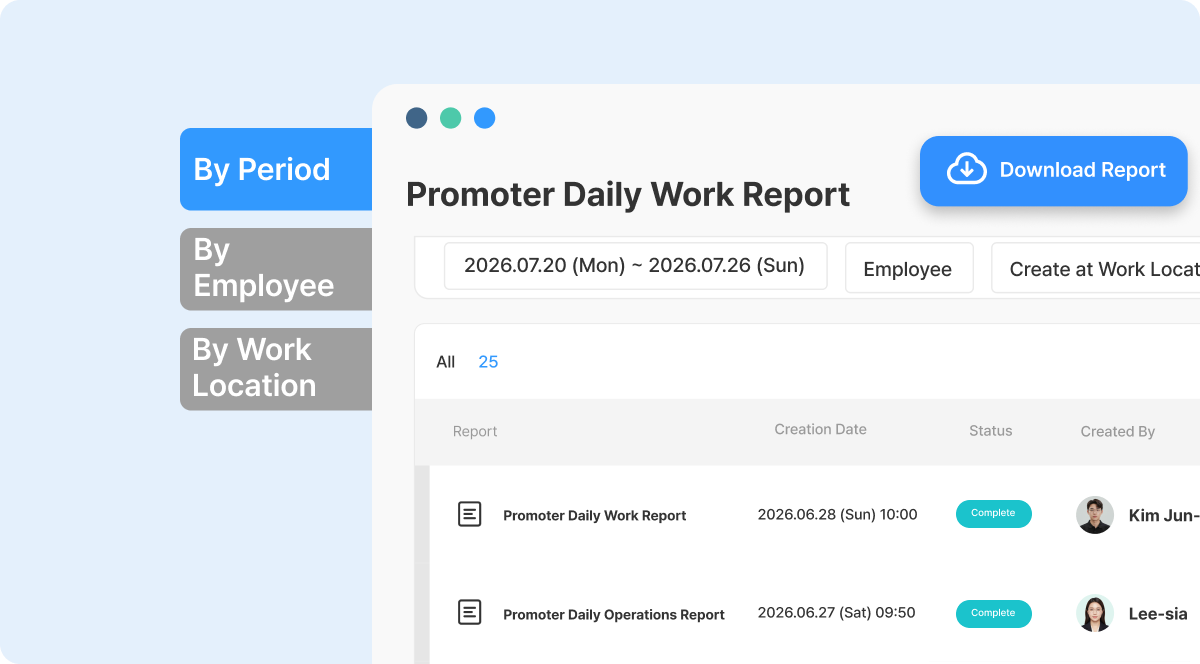
The more promoters you have, the harder it gets to find and compare the reports that matter.
In Shopl, submitted reports can be filtered by store, period, or representative — so you can pull up results from a specific brand's last campaign, or see one promoter's complete activity log in seconds. And when a report is submitted, the assigned admin receives a notification right away, so you can act on field results quickly and send feedback while it's still relevant.
A. Yes. Create a separate report form for each brand and assign the relevant members to each form. Even when promoters from different brands are working in the same store, their reports stay fully separated and organized by brand.
A. Set a due date on each report form. This ensures promoters know exactly when their activity results need to be submitted — keeping everyone on schedule after a promotion wraps up.
A. Yes. The moment a promoter submits a report, a notification is sent to the admin right away. You can review the submission and take any necessary follow-up action directly from the Shopl app or Dashboard (PC) — no delays, no missed updates.
Managing a promoter network doesn't have to mean chasing updates and piecing together information from multiple channels. With Shopl, different report formats per brand, store-level activity records, and on-site photo proof all come together in one place — so you stay in control without the extra overhead.













