샤플 이용료 80% 지원 받기

However, since these records are kept in separate documents, consolidating them into a single monthly attendance report takes a significant amount of time. Given that these records are closely linked to payroll, we must carefully cross-check them against the original data to ensure there are no discrepancies.
This process is time-consuming—so is there a way to manage monthly attendance reports more accurately and efficiently?

Shopl’s [Comprehensive Attendance Report] feature provides HR managers with a structured Excel-format report, consolidating all essential attendance data in one place.
Experience seamless and accurate attendance management with [Comprehensive Attendance Report] today!
Customize Reports with Only the Data You Need

Create a company-specific Comprehensive Attendance Report by selecting the essential data categories such as workdays, working hours, overtime, holidays, and leave records. You can also configure work hour calculations, including designated daily working hours and break time settings, based on company policies. Once set, the report template can be saved and reused whenever needed.
Want to learn how to download the Comprehensive Attendance Report and explore the available data fields? Click the link below!
▸ How to Download the Comprehensive Attendance Report >
Easily View Attendance Records at a Glance
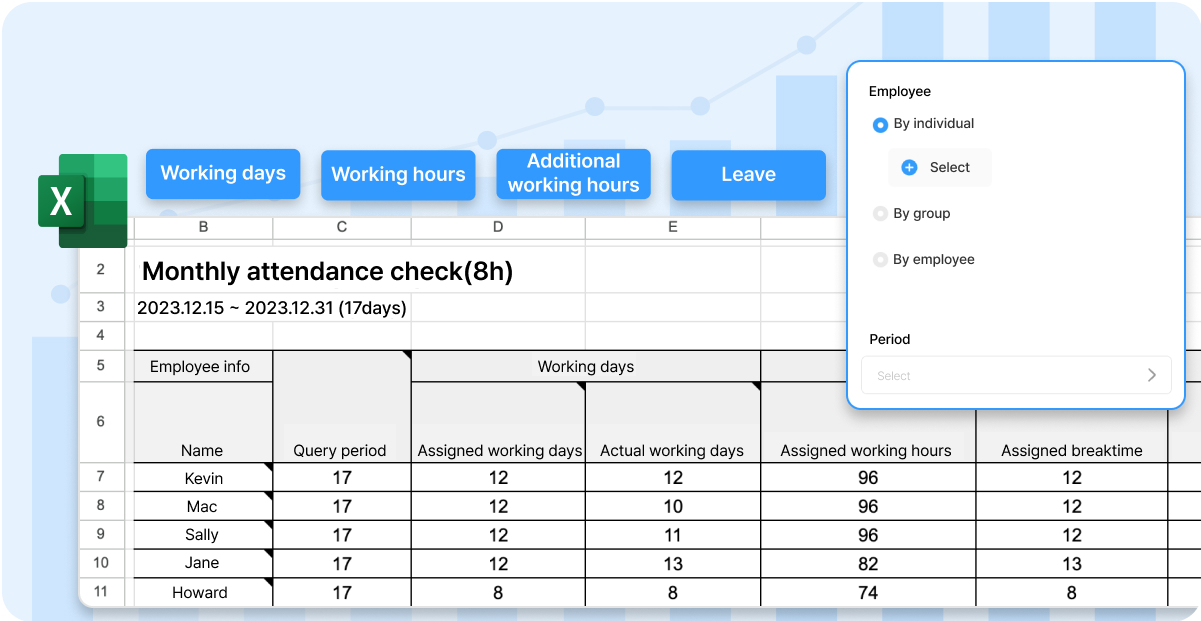
Shopl provides a Comprehensive Attendance Report in Excel format, compiling all attendance data into a single file. With this, you no longer need to manually gather attendance records and create reports periodically.
Use the consolidated report to streamline attendance tracking and enhance workforce management efficiency!
Automatically Calculate Overtime (Extended, Holiday, and Night Work) Hours

Say goodbye to manually calculating overtime hours.
The Comprehensive Attendance Report automatically calculates extended, holiday, and night work hours based on actual work logs. This allows administrators to quickly determine the required overtime compensation, making payroll processing easier and more accurate.
Q. Can each manager save their own report templates?
Each manager or team leader can customize report templates by selecting only the data they need. When creating a report template, you can set the visibility to either "Public to all" or "Private", allowing you to freely generate and save templates according to your needs.

With Shopl's Comprehensive Attendance Report feature, you can streamline and automate the monthly attendance reporting process. Instead of manually compiling multiple records, view punch-in/out logs, leave usage, and overtime hours all in a single Excel report.
Experience efficient and accurate attendance management with Shopl today!