샤플 이용료 80% 지원 받기
An approval request document makes the decision-making process visible across your organization—putting the right people on record and ensuring that major commitments move forward with proper sign-off rather than getting lost in a back-and-forth. Understanding how these documents are structured, and what causes them to get rejected, is the difference between a smooth approval cycle and one that stalls.
An approval request document is a formal internal Document in which a Representative proposes a business action—such as a purchase, contract, or new initiative—and routes it to multiple Approvers for review and sign-off. It serves as the official mechanism for making decisions that no single person or department can authorize alone.
It accomplishes three things: it creates a written record of why a decision was made, it allows risks to be reviewed from multiple perspectives, and it establishes clear accountability. Even in fast-moving environments where decisions often happen over WhatsApp or a quick call, company policy typically requires formal approval for expenditures and contracts above a certain threshold.
Approval request documents are typically required in situations like these:
The exact threshold—how much spending or what types of decisions require formal approval—varies by company size and industry, but having clear internal Rules that define these Criteria by Amount and category is essential.
These three document types are often confused. Here's how they differ:
The Title should make it immediately clear what Approval is being sought. Vague headings slow down reviewers. Specific language—such as "Proposal to Implement [System Name]" or "Contract with [Vendor Name] for Outsourced Services"—helps Approvers engage with the Document right away.
Every approval document needs a clear record of when it was submitted, who submitted it, and which department they belong to. This isn't just formality—it's what allows anyone to trace the history of a decision months or years later.
Explain concisely why this proposal is necessary. Approvers make faster decisions when the problem is backed by concrete facts or figures rather than vague statements. Instead of "sales have been declining," write something like "As of [date], revenue is down 15% year-over-year, driven primarily by [specific cause]."
Spell out exactly what is being proposed—what action will be taken, which vendor or Model is being selected, and why. When multiple options exist, include a comparison and clearly state the Recommended option and the reasoning behind it.
Go beyond the total cost—break down line Items, payment timing, and how this fits within the budget. For the Schedule, identify the Start date, end date, and key milestones. Quantify the expected results: instead of "this will reduce costs," write "we project savings of approximately $X per month," which gives Approvers something concrete to evaluate.
Because approval request documents pass through multiple reviewers, the routing sequence and sign-off structure must be clearly defined. Documenting who reviews first and who gives final authorization makes it easy to spot where the process is stalling if delays occur.
An approval request document is not a narrative Report. Open with exactly what you need approved, then follow with the background, Details, and costs. Even if an Approver only reads the first paragraph, they should walk away knowing the purpose and what decision is being requested.
Statements like "this will improve efficiency" or "costs will go down" carry no weight on their own. Attach quotes, comparison Data, and supporting figures so that Approvers have what they need to make a confident decision—without having to go back and ask for more Information.
When the person submitting the request has already identified the risks and outlined mitigation plans, Approvers' concerns are answered before they're raised. For example: "If implementation is delayed, the fallback is [X]" or "If costs exceed the estimate, we will handle it by [Y]." This kind of transparency is one of the most effective ways to prevent a Reject.
A direct manager typically focuses on operational Details and feasibility, while senior executives zero in on Expenses and risk exposure. Think through what each Approver in the routing chain is likely to scrutinize, and make sure the Document speaks to those concerns directly.
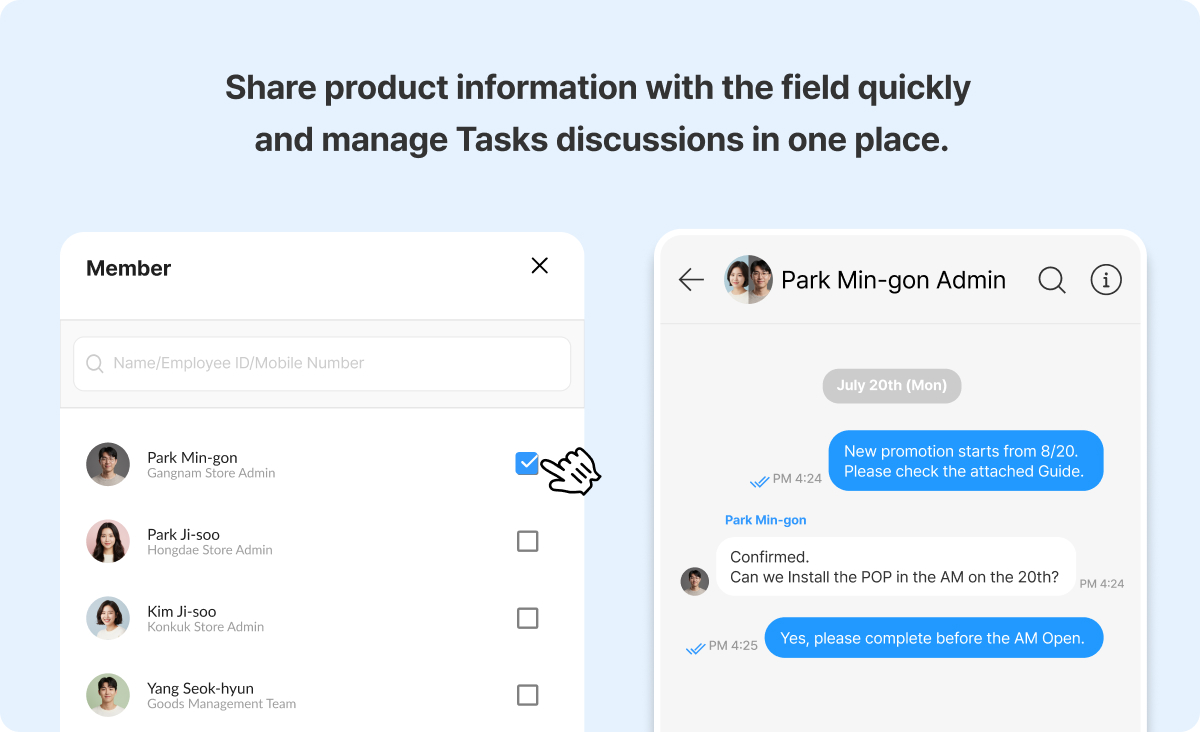
When initiative details get communicated through personal WhatsApp messages, conversations scatter across threads and it becomes nearly impossible to track who said what or confirm whether key information was actually received.
Shopl's Chat lets you communicate directly with Store-level Members without needing to exchange personal phone numbers or Email addresses. Read receipts, Image sharing, and Files are all built in—so every question and confirmation related to an initiative stays in one place, searchable and on record.
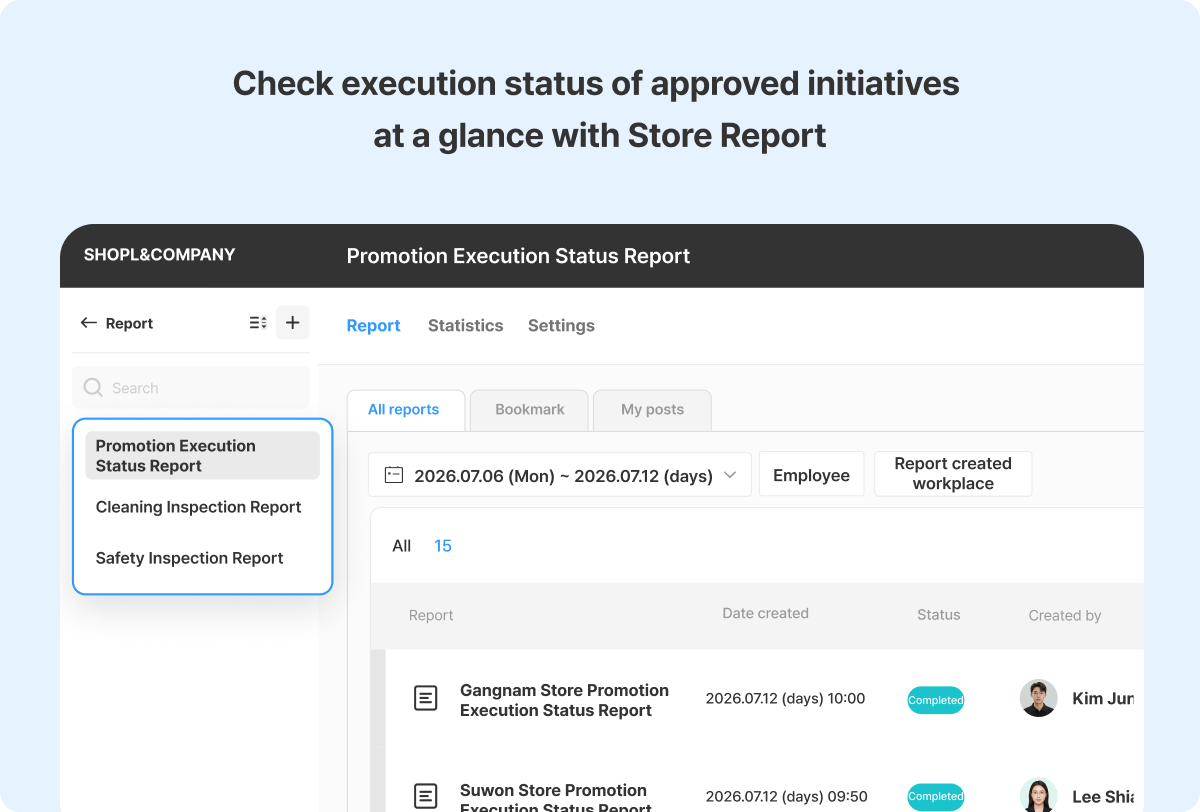
Getting an approval is only the beginning. If Store teams don't follow through consistently, the decision never translates into real results on the ground. Shopl's Report feature lets you define exactly what needs to be reported and by whom, then monitor submission Status in real time. Instead of chasing individual Stores for Updates, you can see at a glance which locations are on track and which aren't—all against the same Criteria.
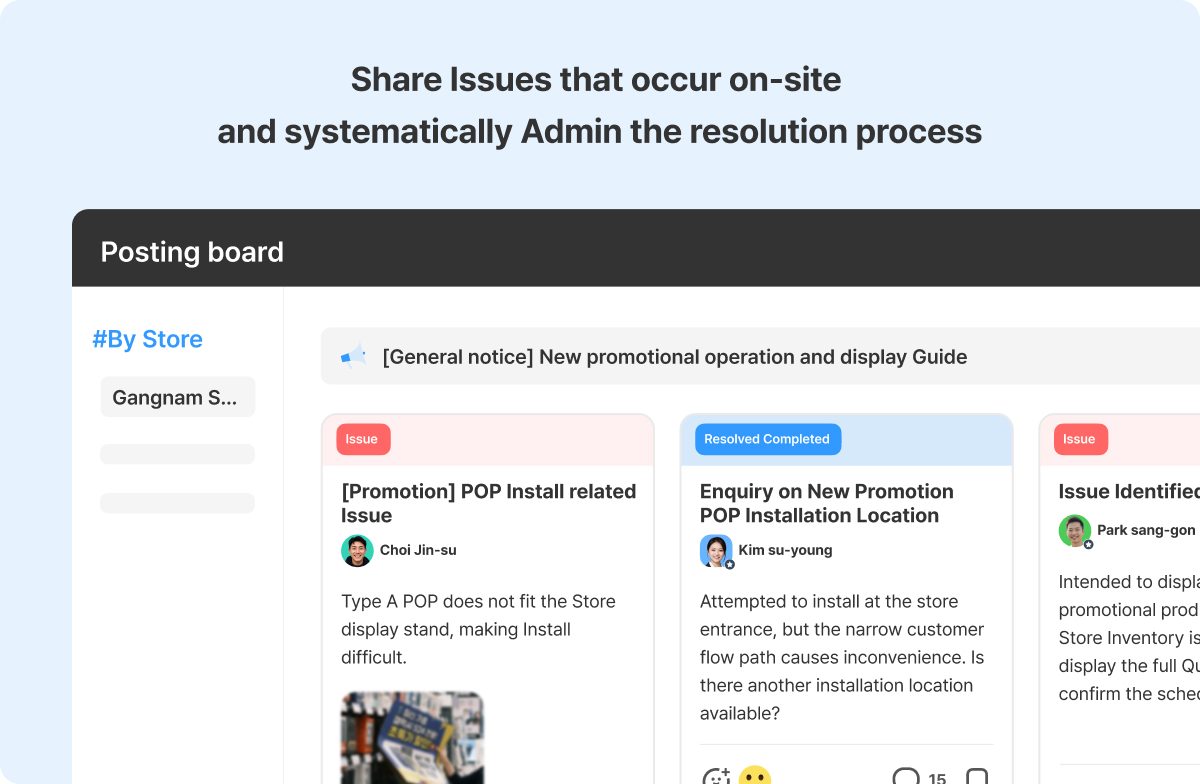
Once an initiative rolls out, individual Stores will encounter problems and surface improvement ideas that no one anticipated from headquarters.
Shopl's Posting Board lets you organize Information by Theme or team, with Images and Files attached for context. The Issue & Resolved board gives you a structured way to track problems from the moment they're reported through to resolution—so nothing gets lost and field challenges feed directly into the next round of improvements.
This turns the communication flow from a one-way broadcast into a two-way loop where headquarters and the field are reviewing outcomes together, not just sending instructions downward.
Approval is not the finish line. A decision only creates real change when it reaches the field Exactly as intended, when execution is verified, and when the challenges that surface along the way are captured and acted on. Shopl supports the full cycle—Chat for alignment, Reports for execution visibility, and the Posting Board for surfacing and resolving field Issues—so that "Approve → Execute → Verify → Improve" becomes a single, connected workflow managed in one platform.
A. An approval request document is routed to multiple stakeholders in sequence to build organizational consensus. Final Approval refers to the binding decision made by an authorized executive at the Final step of that process. How companies label or structure that Final step varies, so it's worth checking your internal policy to understand how the two are defined in your organization.
A. One to two pages is the standard target. The goal is to give Approvers everything they need to make a decision quickly—detailed supporting materials belong in an Attachment, not the main Document. Lengthy documents tend to get Skipped or delayed, which defeats the purpose.
A. Four issues come up repeatedly: the cost justification is unclear, the expected outcomes aren't quantified, risks and contingency plans aren't addressed, and the submission catches Approvers off guard without any prior context. Running through these as a Checklist before submitting is the most practical way to reduce the chance of a Reject.
From drafting the approval request to executing at the Store level, the goal is to move away from relying on individual knowledge or personal WhatsApp threads—and toward a structure where Tasks, decisions, and execution records all live in one place. Shopl gives store operations teams the tools to manage field execution and reporting systematically, and gives headquarters a clear view of how work is actually progressing across every location.
If you want approvals to drive Actual change in the field—not just paperwork—Shopl is built to make that happen.