
샤플 이용료 80% 지원 받기

An ATS (Applicant Tracking System) centralizes everything that tends to fall through the cracks in hiring — applications, candidate status, interview scheduling, and final decisions — all in one place. It standardizes how your team shares information and keeps the process moving, so fewer candidates slip away due to slow follow-ups or missed steps. This guide covers what an ATS actually does, why more teams are adopting one, what to look for when choosing one, and how to keep that momentum going once a new hire walks through the door.
An ATS (Applicant Tracking System) is a hiring management platform that keeps all candidate information and pipeline status in one place. Instead of juggling job postings, applicant data, stage tracking, interview coordination, and hiring analytics across separate tools, everything lives in a single system.
When your team has been managing candidates through spreadsheets and email threads, it's easy for things to get out of sync. An ATS gives everyone — not just the person who sent the last email — a real-time view of where each candidate stands and who's responsible for the next step.
The hiring market moves fast, and candidates are often talking to multiple employers at once. A slow or inconsistent response can cost you the hire. At the same time, many organizations are now posting across multiple job boards simultaneously, which means more applications coming in through more channels — and more room for things to get lost.
That's where manual, person-dependent hiring management starts to break down. More teams are recognizing that standardizing the process and removing single points of failure isn't just a nice-to-have — it directly affects whether you fill roles on time.
Some ATS platforms pull applications from multiple job boards into a single dashboard, so your team isn't logging into five different sites to check who applied. Every candidate's name, Phone no., work history, and source channel is stored in one place, making it easy to compare candidates or pull up historical data when you need it.
At any given time, your team might be reviewing resumes for one candidate, waiting on an interview confirmation for another, and chasing an offer acceptance from a third. An ATS makes each stage visible at a glance — whether that's "application under review," "interview being scheduled," or "offer pending." When responsibility is clear and progress is visible, handover mistakes and duplicate outreach become far less likely.
Depending on the platform, you can send interview invitations, coordinate scheduling, and automate reminder Notifications directly within the system. This cuts out the manual effort of drafting and sending individual emails and reduces the risk of scheduling conflicts or forgotten follow-ups. Using templates also keeps candidate communication consistent across your team, regardless of who's handling the outreach.
An ATS tracks metrics like application volume, stage-by-stage conversion rates, offer acceptance rates, and results by hiring channel. Comparing cost-per-hire and applicant volume across job boards helps you make smarter decisions about where to invest your recruiting budget. When you can see exactly which stage candidates are dropping off, you have something concrete to act on for the next hiring cycle.
When hiring is managed through personal spreadsheets or individual inboxes, it's only a matter of time before someone thinks a message went out when it didn't, or a status Update gets skipped. With an ATS, the system tracks what actions are still outstanding, so the process doesn't depend on any one person remembering to check their notes.
When multiple people are involved in hiring, each with their own tracking method, it's hard to get a clear picture of where things stand. An ATS means everyone logs information in the same format, so the full picture is always available to the whole team. When someone goes on leave or hands off a candidate, there's no scrambling to piece together what happened.
When hiring decisions are based on gut feel, there's nothing to measure and nothing to improve. Once you start accumulating Data, you can step back and objectively assess what's working. Regularly reviewing application volume and cost-per-hire by channel turns hiring from a reactive scramble into a process you can continuously sharpen.
Before evaluating any platform, get clear on how hiring actually works at your organization — from application intake through resume screening, interviews, offer, and onboarding paperwork. If your process isn't defined before you implement a system, it won't stick on the ground. Start by identifying where things currently break down, then look for a tool that addresses those specific gaps.
Verify whether the ATS connects via API or data sync with the job boards you're already posting on (Indeed, LinkedIn, ZipRecruiter, etc.) and with your existing HRMS. If it doesn't integrate, you'll end up entering the same information in two places — which means more work, not less, and a higher chance of errors.
An ATS holds sensitive candidate information — names, Phone no., work history, and more. Make sure the platform lets you define who can view or edit which information based on their role, and that its data retention and deletion policies align with your organization's compliance requirements. The ability to limit access to recruiting staff only, or to show interviewers only the candidate they're scheduled to meet, is worth evaluating carefully as part of your selection Criteria.
A system packed with features is useless if the people doing the hiring don't use it consistently. Take advantage of free trials or demo sessions to test the experience hands-on. When evaluating usability, think beyond the administrators — consider what it's like for an interviewer or a store team leader who only logs in occasionally.

Getting employment contracts and consent forms signed correctly — and keeping proof that they were — is one of the most error-prone parts of bringing someone new on board. Shopl's 【E-documents】 feature lets headquarters send required documents directly to employees and track who has viewed and Signed them. Instead of chasing down paperwork store by store, you have a clear record of where every document stands.

Once a new hire is placed, their assigned Store and first Work schedule need to be sorted out quickly. Shopl's 【Schedule】 feature lets you apply pre-built Store schedule Templates so you're not building shifts from scratch every time. As soon as a Schedule is set or Updated, employees receive a push notification on their phone — so new hires know exactly when and where to show up, from day one.
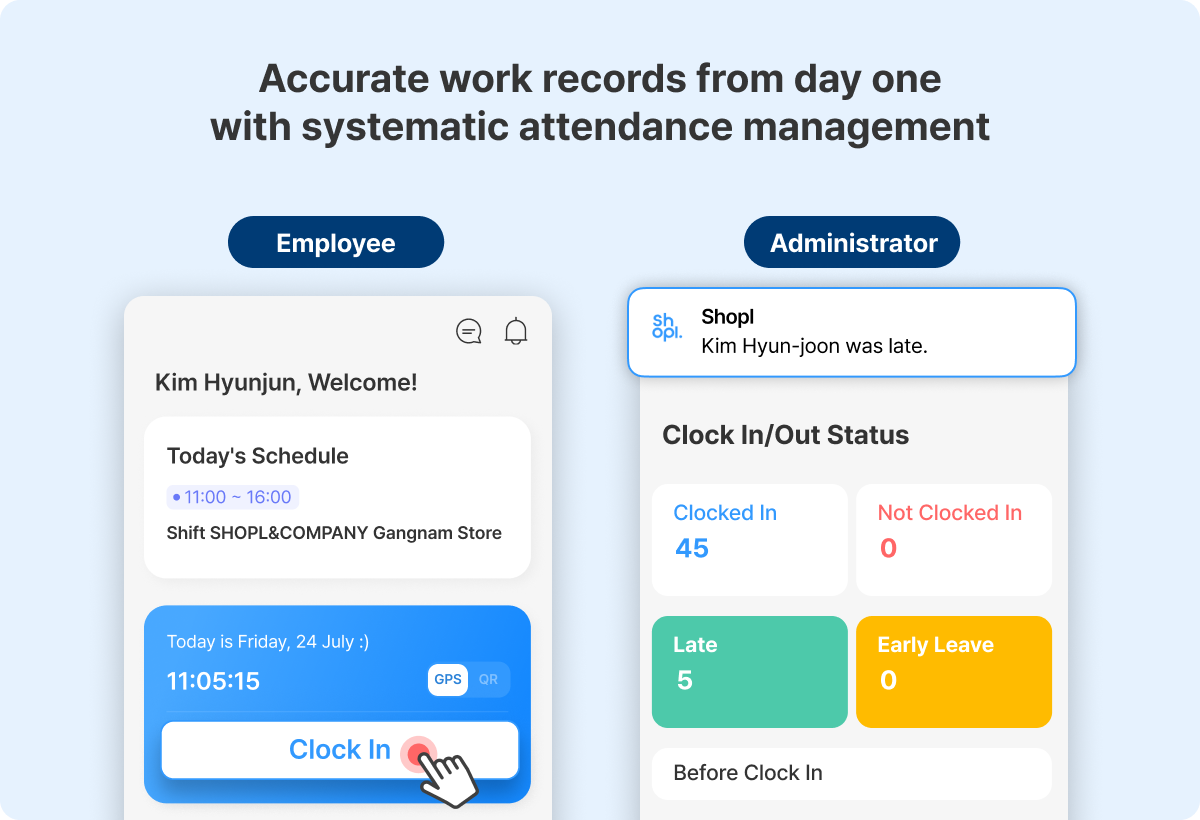
Reliable Store operations depend on knowing who's actually working and when. Shopl's 【Attendance】 feature records clock-ins and clock-outs using GPS, QR code, or facial recognition (optional), giving you real-time Work Status across all your locations. Headquarters and Store managers work from the same Data — no more manually compiling timesheets or guessing at coverage.

New hires have a lot to absorb quickly, and if they can't find the information they need, they'll keep asking — which costs your HR team time. Organize internal workflows, required document checklists, and company culture resources by Category on Shopl's 【Posting board】, so new employees can find what they need without having to ask.
This cuts down on repeated questions and makes sure nothing gets missed during onboarding. Posts support Images and Video Attachments, so you can show what's hard to explain in writing alone. From first-day orientation through ongoing compliance Education, the Posting board keeps everything accessible in one place.
Think of it this way: an ATS manages the information flow up to the point of hire. Shopl picks up from there — giving new employees a clear, consistent start and giving managers the visibility they need to run their stores without relying on memory or individual workarounds. Together, they close the gap between recruiting and stable day-to-day operations.












